Apple Xcode 26.3 Introduces Agentic Coding with Claude Agent and OpenAI Codex Integration
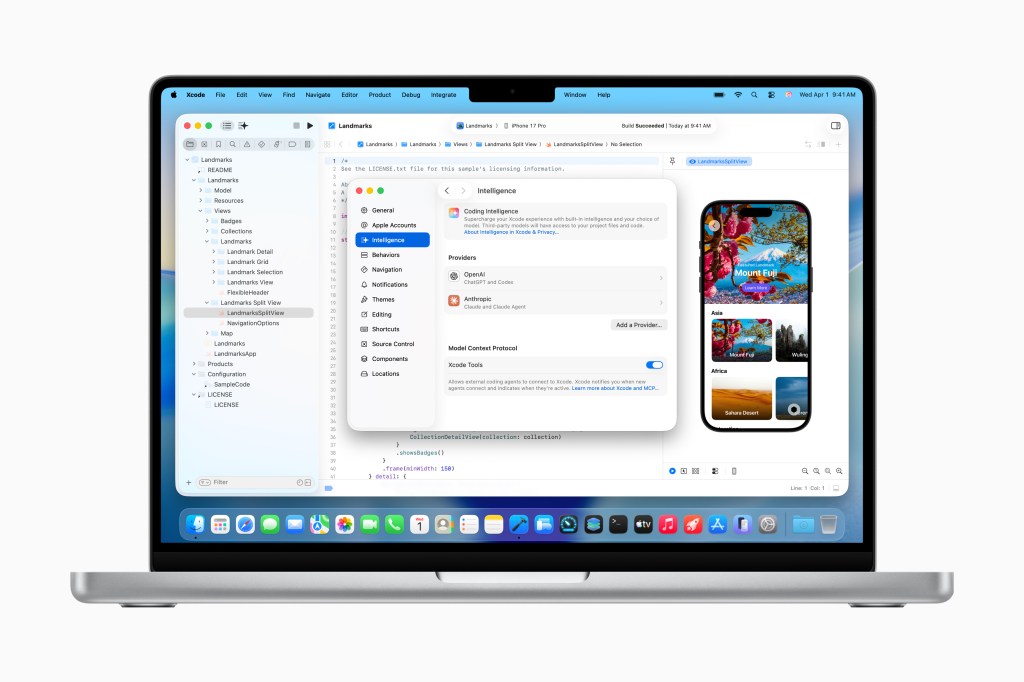
Apple has announced the release of Xcode 26.3, marking a significant advancement in integrated development environment capabilities by introducing native support for agentic coding tools. The update enables developers to leverage Anthropic's Claude Agent and OpenAI's Codex directly within Apple's official application development suite.
The Xcode 26.3 Release Candidate is currently available to all Apple Developers through the developer portal, with a general App Store release scheduled for the near future. This release builds upon the Xcode 26 update from last year, which initially introduced ChatGPT and Claude integration into Apple's IDE ecosystem used for developing applications across iPhone, iPad, Mac, Apple Watch, and other Apple platforms.
Enhanced AI-Driven Development Capabilities
The integration of agentic coding tools represents a paradigm shift in how AI models interact with Xcode's feature set, enabling more sophisticated automation and complex task execution. These AI agents have direct access to Apple's current developer documentation, ensuring utilization of the latest APIs and adherence to best practices during the development process.
At launch, the agentic tools can perform the following operations:
• Project exploration and structural analysis
• Metadata comprehension and interpretation
• Automated project building
• Test execution and error detection
• Autonomous error remediation
Technical Implementation and Protocol Support
Apple collaborated extensively with both Anthropic and OpenAI to optimize the agentic coding experience. The company focused particularly on token usage optimization and tool calling efficiency to ensure seamless agent operation within the Xcode environment.
Xcode leverages the Model Context Protocol (MCP) to expose its capabilities to AI agents and facilitate tool connectivity. This MCP implementation enables Xcode to interface with any MCP-compatible external agent for operations including project discovery, code modifications, file management, preview generation, snippet handling, and documentation access.
Developer Workflow and User Experience
To utilize agentic coding features, developers must first download their preferred agents through Xcode's settings interface. Account authentication is accomplished either through direct sign-in or API key integration with AI providers. A dropdown menu allows developers to select specific model versions (for example, GPT-5.2-Codex versus GPT-5.1 mini).
The interface features a prompt box where developers can issue natural language commands to specify project requirements or code modifications. For instance, developers can instruct Xcode to implement features using Apple's frameworks while defining appearance and functionality parameters.
Transparent Development Process
As agents execute tasks, they decompose complex operations into granular steps, providing clear visibility into the development process and code transformations. The system retrieves necessary documentation before initiating coding operations. Code modifications are visually highlighted, while a project transcript panel displays detailed information about underlying processes.
This transparency is particularly valuable for developers in learning phases. Apple is hosting an interactive code-along workshop on Thursday through its developer platform, where participants can observe and practice using agentic coding tools in real-time with their own Xcode instances.
Validation and Version Control
Upon completion, AI agents verify that generated code functions as intended. Based on test results, agents can perform additional iterations to resolve errors or address issues. Apple recommends prompting agents to articulate their implementation strategy before coding, as this pre-planning phase can enhance overall process quality.
Xcode implements automatic milestone creation with each agent-initiated change, enabling developers to revert to previous code states at any point if results are unsatisfactory.
Sources:
🔔 Stay tuned and subscribe →
Related news


Try these AI tools
Optimize Google Sheets with AiAssistWorks: AI automation, data analysis, and content generation made...

Discover personalized show and movie recommendations with Watchthis.dev, powered by OpenAI and Verce...

Discover instant video summaries on YouTube with the ChatGPT for YouTube extension. Choose from free...